iSync bridges iCloud access to Android for cross-platform users
iSync: Access to iCloud, by Monika Gupta, provides Android access to Apple iCloud accounts for cross-platform data continuity. The app supplies a central dashboard and dedicated access point that expose core iCloud services on Android, enabling management of cloud data and account access without an iOS device. Key highlights include a privacy-focused design and a central access point for Apple services from Android. Suited to professionals, former iPhone users, and multi-device workers.
iSync acts as a single-point bridge for Apple cloud services
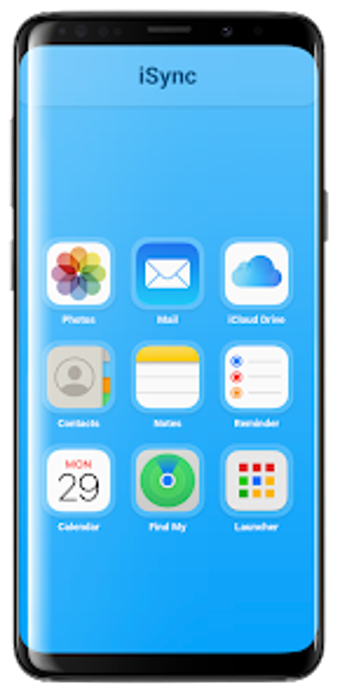
On Android the app presents a unified interface that brings multiple Apple-hosted services into one place. It grants access to iCloud Mail, iCloud Photos, iCloud Drive, Notes, Reminders, and a Find My device lookup. Use the dashboard to navigate between account views and service sections, and rely on the app’s consolidated surface rather than juggling several third-party sync utilities.
How iSync fits document and communications workflows
The tool supports common business tasks: reading and composing Mail tied to an Apple account, browsing and downloading images from the photo library, and opening or saving documents from iCloud Drive. Notes and Reminders sync allow project references and task items to follow a mobile workflow. Professionals migrating a client file or retrieving an attachment can perform those steps from one Android interface without returning to an iOS device.
Onboarding and daily use suit cloud-savvy professionals
Setup asks for Apple account access via app-specific credentials and targets devices running Android 6.0 or higher. Daily navigation leans on the app’s single-access layout; users familiar with cloud accounts find the layout straightforward, while those unfamiliar may need a short configuration step for account permissions. The design prioritizes a focused, privacy-oriented flow rather than guided templates or built-in training.
Compatibility, provenance, and reception matter for team use
iSync is a third-party product from developer Monika Gupta, associated with AppCollection.in, and not affiliated with Apple. The app’s presence on tracking platforms shows positive community ratings and frequent praise for consolidated access. Some advanced capabilities are mentioned as tied to a premium tier, which affects power users who expect every integration unblocked by an account level or feature gate.
A practical choice for individuals who need Apple-hosted access on Android
iSync is a suitable option for professionals who require continued access to Apple-hosted workflows on an Android device; it favors individual contributors and small teams that can manage third-party tools and modest configuration. One trade-off is that it operates outside Apple’s official ecosystem, so organisations needing vendor-backed support or strict provenance controls should evaluate governance implications before adopting it for critical workflows.